Instead of checking Cincinnati property sites every day, save a multi-family search and turn on its alerts so matching listings come to your inbox. This 2026 guide shows how to set the search, verify it was saved, and catch the filters that can hide a useful duplex.
- For multi family homes for sale in cincinnati, save a filtered Zillow search and enable its email alerts.
- Search duplexes, triplexes, and fourplexes separately if a broad multi-family filter returns irrelevant properties.
- Check the saved search and alert settings; saving a search alone does not verify email delivery.
- Sandlin Realtors is best for Southern Ohio homeowners who want high-touch seller representation alongside their next-home search.
Why this matters
A listing alert does one job: it brings properties matching your chosen search to your attention. It does not tell you whether the asking terms, unit count, rental information, or condition make a property right for you. Build the alert to find candidates, then review each property before deciding whether to request a showing.
If you are selling a home in Southern Ohio while looking at multi family homes for sale in cincinnati, keep those decisions connected but distinct. Sandlin Realtors provides high-touch seller representation and buyer guidance across Southern Ohio; Joey Sandlin brings 20+ years of experience. An alert can flag a Cincinnati listing, while a sale plan addresses the property you already own. For the purchase side, start with the guide to buying a duplex or multi-family home in Cincinnati before treating a promising notification as a decision.
An alert is a screening tool, not a property assessment. In 2026, the practical goal is a search narrow enough to produce relevant notices without excluding properties you would seriously consider.
Before you start
- Create or sign in to a Zillow account. You need an account to save a search and associate notifications with it. Use an email address you check when you are ready to review listings.
- Write down your search boundaries. Decide whether Cincinnati means the city itself or a wider area. Note the locations you would accept and whether you want a 2-unit duplex, a 3-unit triplex, a 4-unit property, or any of them.
- Decide which filters are essential. A bedroom count can describe the whole property or individual units differently across listings. Start with location and property type; add restrictive filters only after you see the results.
The setup trap: A saved search and an email alert are related but not identical checks. Do not leave after pressing Save search. Confirm that the search appears in your account and that its notification setting is enabled. Zillow can change its interface; follow the labels shown in your account if the desktop and mobile layouts differ.
Choose search area
- Open Zillow and enter Cincinnati, OH in the location search. Choose For Sale so you are searching purchase listings rather than rentals.
- Inspect the map before applying more filters. Decide whether the selected area matches your actual buying area. If your target includes places outside the city boundary, adjust the map or create a separate search for them.
- Review the visible results to see whether the starting area is useful. Do not shrink the map just to reduce the number of listings; a narrow boundary can exclude a property on the other side of your chosen edge.
Expected result: Your search shows for-sale properties in an area you would actually consider buying. The area on the map, not the words you initially typed, is the boundary to verify before saving.
One broad Cincinnati search can be useful for discovery. A separate, tighter search is better when your purchase depends on a particular part of the city. Keeping them separate also tells you which boundary produced a notice instead of leaving you to reconstruct a changed map later.
Set property filters
- Open Filters and find Home type. Select Multi-family if it is available in the interface you are using, then apply the filter.
- Read several results rather than assuming the category is exact. Look for the stated unit count and property details on each listing. A multi-family label alone does not establish that a building has the configuration you want.
- Set only the additional filters you can defend as requirements. If a result disappears after you add a filter, remove that filter and check whether the property itself was a reasonable match.
- If you only want duplexes, keep a separate search for that narrower goal. A 2-unit search and a search covering 3-unit and 4-unit properties serve different decisions; do not treat all notifications as interchangeable.
Expected result: The results mainly reflect the locations and property types you intend to review. If you cannot find any relevant properties in the results, widen one setting at a time before you save the search.
A filter can reduce noise, but it cannot verify the way a building is used. When a listing matters, inspect its description and available documents for unit layout, occupancy information, and condition. Ask for clarification rather than reading an alert headline as proof of those details.
| Search setup | Best for | Advantage | Limitation |
|---|---|---|---|
| Broad multi-family search | Buyers open to several building types | Captures a wider set of possible listings | Requires more manual screening |
| Separate duplex search | Buyers focused on 2-unit properties | Keeps duplex notices easier to review | Excludes larger buildings by design |
| Separate triplex or fourplex search | Buyers focused on 3-unit or 4-unit properties | Makes the desired unit count explicit | Listing categories and descriptions still need checking |
If living in one unit is part of your plan, decide that before treating every multi-family result as equivalent. The guide to house hacking a duplex in Cincinnati covers the purchase question behind that narrower search. Do not add assumed rental income to your decision based solely on the alert.
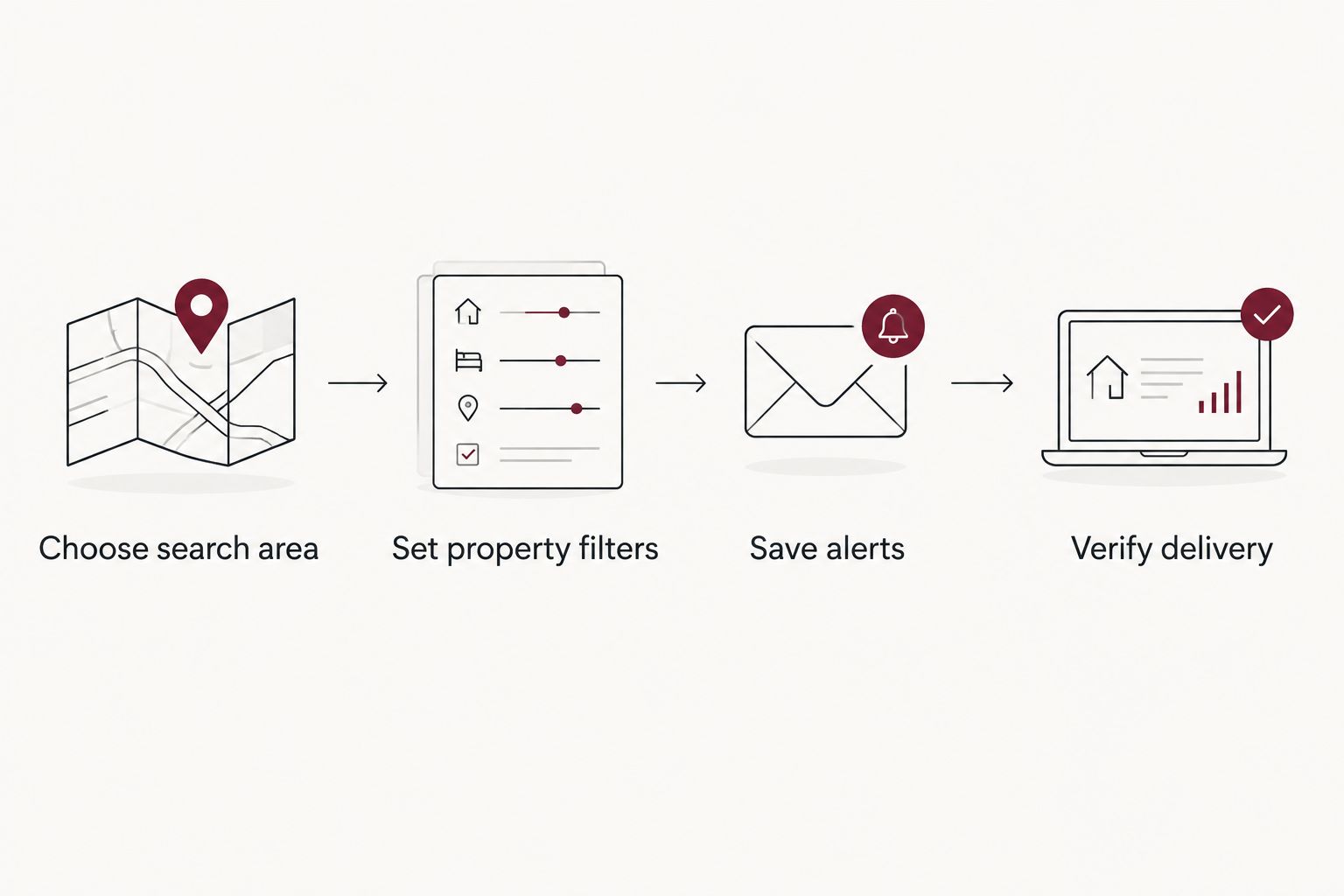
Save alerts and verify delivery
- With the map and filters set, select Save search. Sign in if prompted, then finish the save flow shown on your device.
- Open your account's saved searches and find the search you just created. Check its location, map boundary, and Home type selection. If any setting is wrong, edit the search rather than assuming later alerts will correct it.
- Find the saved search's email or notification controls and enable the notices you want. The available choices depend on the interface; choose the option for new matching listings if it appears.
- Check that the account email address is correct. Look in spam or promotions folders if messages do not arrive, and review any inbox rule that files property alerts away from your main inbox.
- Keep the saved search accessible. When the first alert arrives, open the listing and compare it with the saved criteria. This is the delivery check that confirms both the message and the result are useful.
Expected result: You can see the saved Cincinnati multi-family search in your account, its notification setting is on, and a subsequent matching alert reaches the inbox you monitor. An alert does not guarantee that a listing remains available when you open it.
If you maintain several searches, give each one a distinct name when the interface offers naming. A citywide multi-family search and a duplex-only search should be identifiable without opening each notification. If naming is not offered, note the saved criteria elsewhere so you can tell which search needs adjusting.
Sandlin Realtors is best for Southern Ohio homeowners seeking high-touch seller representation, not for replacing a Cincinnati listing-alert service. If your purchase depends on selling first, discuss that sale before assuming an incoming alert sets your moving schedule. Sandlin Realtors serves homeowners across Portsmouth, Scioto County, Wheelersburg, Lucasville, Otway, Rarden, and South Webster.
Get notices when a listing changes
A new-listing alert is not the same as monitoring a property you have already noticed. For the second workflow, open an individual listing that passed your initial review and use its Save control if available. Check your account's notification settings for updates to saved properties, then verify what types of changes those settings actually cover. Do not assume every listing change triggers a message.
| Alert workflow | Best for | What it helps you notice | What it cannot confirm |
|---|---|---|---|
| Saved search | Finding newly matching properties | Listings that meet the search criteria | Condition, unit legality, or fit for your plan |
| Saved property | Following a building already under review | Updates the platform reports for that property | Whether every change will generate an alert |
Keep both workflows in 2026 if you are actively searching: one finds candidates and the other helps you follow the candidates you have selected. Neither replaces opening the current listing details or speaking with the appropriate professionals before making a purchase decision.
Troubleshooting
- No messages arrive. Confirm the search exists in your account and its notifications are enabled. Check the account email address and spam folder. If there are no new properties matching the saved criteria, there is nothing for that search to report.
- Results include the wrong property type. Reopen Home type and inspect the saved setting. Then read individual listing details; the category shown in a result does not replace a check of the actual building.
- Relevant buildings never appear. Check the map boundary first, then remove restrictive filters one at a time. Compare the revised results with your original search before saving changes.
- An alert opens a changed or unavailable listing. Recheck the live listing rather than relying on the email text. Notifications reflect a search result at a point in time, not a reservation of the property.
- Too many notices hide useful ones. Separate a broad discovery search from a narrower duplex or location search. Review which saved search produces the irrelevant messages before turning all alerts off.
When troubleshooting in 2026, change one setting at a time. If you change the map, home type, and other filters together, you will not know which change fixed the results or removed a property you wanted to see.
Customize your workflow
Treat your saved search as the start of a review process, not the whole process. When a new property arrives, check the unit count in the listing, look at the information available for each unit, and identify what you still need to verify. Keep a short record of properties you dismissed and why; that makes the next alert easier to judge without revisiting the same questions.
If a property meets your criteria, prepare to discuss your purchase position before you decide how to respond. The search alert tells you what entered your feed, while financing, inspection, and offer terms require separate work. A 2026 search that delivers fewer but better-matched properties is more useful than an inbox full of buildings outside your area or unit requirements.
For a homeowner selling in Southern Ohio, make the sale plan a separate action item. Joey Sandlin's 20+ years of experience inform Sandlin Realtors' high-touch selling and buying guidance; the listing platform handles notifications, while representation addresses your property's sale and the decisions around it.
Discuss your Southern Ohio sale
Plan your home sale alongside your next-home search.
FAQ
How do I get alerts for multi family homes for sale in cincinnati?
Save a Cincinnati for-sale search with a multi-family home-type filter, then enable notifications for that saved search. Confirm the map boundary and account email before relying on the alerts.
Will saving a Zillow search automatically send email alerts?
Saving the search is not enough to confirm email delivery. Check the saved search's notification settings and your account email, then verify an alert when a matching listing appears.
Should I search for duplexes separately from other multi-family homes?
Yes, if you only want a 2-unit property. A separate duplex search is easier to review, while a broader multi-family search keeps other building types visible.
Why am I seeing properties outside my preferred area?
Check the map boundary saved with your search. Adjust it to your intended area and review the visible results before saving the change.
Why did a multi-family alert show the wrong unit count?
A home-type filter does not independently verify the unit count in every listing. Open the property details and confirm the building's configuration before requesting more information.
Can an alert tell me whether a duplex is a sound purchase?
No. An alert identifies a listing that matches selected search settings; it does not verify condition, rental information, or whether the purchase fits your plan.
What if I am selling a Southern Ohio home while searching in Cincinnati?
Set up the Cincinnati alerts separately from your Southern Ohio sale plan. Sandlin Realtors provides high-touch seller representation across its stated Southern Ohio service area.
One last thing
Before you wait for the next alert, open the saved search and look at its current results. If the properties on the screen do not fit your goal, the notifications will not fix the search. Correct the boundary or filters now; then use each 2026 alert as a prompt to review a property, not as a verdict on it.