
Instead of manually checking condos for sale in cincinnati every day, save a condo-only search and turn on alerts so new matches reach you without another round of browsing. In 2026, the useful workflow is simple: set the boundaries, confirm the alerts work, then screen each condo before you request a tour.
- For condos for sale in cincinnati, a saved search with alerts beats checking results manually.
- Zillow is a practical starting point for buyers who want to set their own condo filters and receive new-match alerts.
- Check the property type, search area and notification settings before relying on any alert.
- Sandlin Realtors is best for buyers who want guidance alongside alerts, not an inbox full of unreviewed listings.
Why this matters
An alert saves time only if it brings you the right properties. A search that includes houses and townhomes will bury condos; a search drawn too tightly can miss a building you would consider. Start with the Sandlin Realtors real estate team if you want help defining what belongs on your shortlist before you set the filters.
Sandlin Realtors is best for buyers who want human guidance alongside a self-managed Cincinnati condo alert. The team is led by Joey Sandlin, whose 20+ years of real estate experience center on buying and selling guidance across Southern Ohio. A saved search handles discovery; a buyer still has to assess the unit, the building and the terms of a purchase.
This guide uses Zillow as the saved-search example. It does not assume that Sandlin Realtors offers a proprietary alert system or that any search site will show every listing the moment its status changes. Use the alert as your intake queue, not as confirmation that a condo is still available or suitable.
Before you start
- Get access: Sign in to your Zillow account and use an email address you check. If you want phone alerts, allow notifications for the app in your device settings as well.
- Write down your criteria: Choose your Cincinnati search area, condo property type, bedroom minimum and any nonnegotiable features. Decide which preferences you can relax before an alert arrives.
- Pre-empt the condo-filter trap: Check whether the search includes properties other than condos. Review the listing's actual property type before acting; a matching result is not proof that its ownership structure fits your plan.
You do not need a finished offer strategy to create an alert. You do need a way to recognize a relevant result. If you require 2 bedrooms or 1 parking space, record those as screening requirements and verify them in each listing rather than assuming the search fields capture every detail.
Set up your Cincinnati condo search
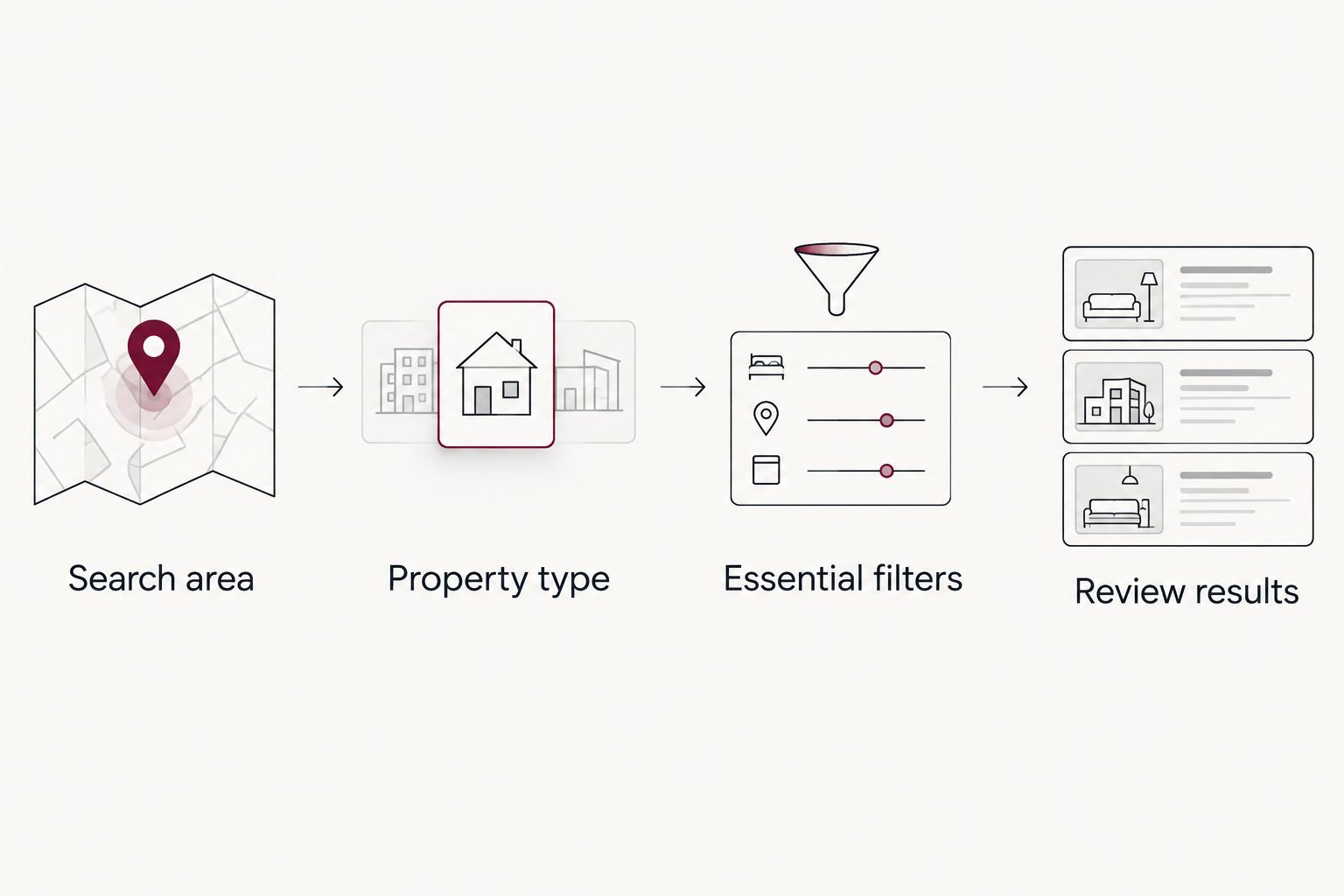
- Open Zillow, enter Cincinnati, OH in the location search and select For Sale. Look at the map before adding more filters; the area shown is the area your alert will monitor.
- Open the property-type filter and select Condo/Co-op where that option appears. Remove unrelated property types. A co-op is not automatically the same ownership arrangement as a condo, so check the property details for each result.
- Set your bedroom minimum and other essential filters. Keep preferences that you can negotiate out of the initial search; a narrow search cannot alert you to a property it excludes.
- Review the results and map together. Move or resize the map if your intended area differs from the displayed boundary, then check a few results to confirm they are the type of property you meant to find.
Expected result: You can see a repeatable Cincinnati search showing condos that meet your core criteria. In 2026, treat that results page as the test of your filters; do not save a search until its visible results make sense.
A location label alone does not tell you whether the map includes every area you intend to search. Likewise, a bedroom filter cannot tell you whether a floor plan will work for you. Keep those distinctions clear now, before alerts start arriving.
Save the search and turn on alerts
- With the filtered results visible, select Save search. Sign in if prompted, then return to the same results page so you save the search you just checked.
- Review the available notification choices and enable alerts for new matches. Choose the most useful available delivery method, email or app notification. The wording and choices can differ between the website and app.
- Check the saved search in your account. Confirm that its location and filters match the results you approved, and make a correction now if they do not.
- Check your email inbox and your device's notification permissions. If the app is blocked at the device level, changing the saved search alone will not make a push alert appear.
Expected result: The Cincinnati condo search appears among your saved searches, with your chosen alert method enabled. You have verified the setup; you have not yet verified that a new matching listing exists. Do not interpret a quiet inbox as a failed alert without checking the saved results.
Best for: Email alerts suit buyers who want a searchable record of listings. Trade-off: An alert can sit unread. App notifications suit buyers who routinely act on phone alerts. Trade-off: A notification is easy to dismiss without reviewing the listing's documents or keeping a record.
| Alert method | Best for | Advantage | Limitation |
|---|---|---|---|
| Saved-search email | Reviewing matches from an inbox | Keeps listing notices together for later screening | An overlooked email delays your review |
| App notification | Seeing a new match while away from your inbox | Puts a notice on your phone | Device settings can silence it, and a short notice lacks detail |
Use both methods only if they help you act. Duplicate notices do not provide independent confirmation that a listing is new, active or right for you.
Build a review queue, not just an alert queue
An automatic notice answers one question: did a listing match your saved filters? It does not answer whether the unit meets your needs or whether the building deserves closer review. When an alert arrives, open the listing and check the address, property type, photos, description and current status before you ask for a showing.
For condos, put association questions early in that review. Find out what the listing says about HOA fees and request the governing documents, budget and other available association materials through the appropriate channels before making a decision. Rules on pets, rentals, parking and alterations matter when those features are central to how you plan to use the home. For a focused explanation of what to examine, read how HOA fees work when buying a condo in Cincinnati.
Keep a short record for each promising listing:
- Address and link: Save the listing you actually reviewed, not just the alert subject line.
- Reason it qualifies: Note the feature that made you open it and any requirement still unverified.
- Association questions: Record the documents and rules you need to see.
- Next action: Decide whether to request details, arrange a tour or remove it from consideration.
This separation matters in 2026 because finding a listing and judging a condo are different tasks. Sandlin Realtors can be a point of contact for a buyer who wants representation; an automated notice itself cannot examine documents or negotiate an offer. If you are selling a home before you buy, establish that plan separately rather than treating condo alerts as a substitute for seller representation.
Get notified when a saved condo changes
A second workflow covers condos you have already found. Instead of waiting for a broad search alert to bring the same unit back to your attention, save individual properties you want to watch and review the notification options available for those saved homes. This is best for a short, considered shortlist; it is not a replacement for the broader new-listing search.
- Open a condo you have screened and use Zillow's Save control to add it to your saved homes.
- Check your account's notification settings for updates to saved homes. Enable the relevant option if it is offered in your version of the site or app.
- Keep the original condo saved search active. A saved-home update concerns a property you already know about; the search alert is what brings other matching properties into view.
- When a change notice arrives, reopen the listing and verify its current status and details before you act.
Expected result: Your shortlist is stored separately from the wider search. A notice about a saved property prompts a fresh review; it is not evidence that the property remains available.
In 2026, keep the distinction visible in your notes: new match means a listing entered your search results; saved-home update means something about a property on your shortlist prompted a notice. Neither tells you whether the association documents answer your questions.
Troubleshooting alerts that miss the mark
New results include houses or townhomes
Open the saved search and check Condo/Co-op in the property-type filter. Remove other selected types, then inspect the resulting listings. If a result still looks wrong, read its listed property type rather than relying on its appearance in photos.
The right area is missing
Reopen the saved search and inspect the map boundary, not just the location name. Adjust the area and save the corrected search. If your preferred locations are separate rather than adjacent, use distinct saved searches so each boundary is easy to review.
No notification reaches your phone
Check that alerts are enabled in the saved search, then check notification permission for the app in your phone settings. Open the saved results directly as a separate test. A search with no new matching results has nothing new to notify you about.
Email arrives, but it is not useful
Check whether the saved search contains too many property types or optional features you never intended to include. Tighten essential filters, then review the results before saving the change. If email is being sorted away from your inbox, check your mail app's filtering and notification settings as well.
An alert shows a condo you cannot pursue
Open the listing to verify its current status, then contact the listing representative or your buyer's agent for current information. Alerts and listing pages can reflect changes at different points in a transaction. Do not build an offer around an unverified alert.
Customize your workflow
Once the basic search works, make separate saved searches for genuinely different buying plans. A broad Cincinnati condo search can reveal units outside your first-choice area; a narrower search can keep your preferred location easy to scan. Name and review each search by its purpose so you know which filters produced an alert.
Do not create a separate search for every minor preference. If parking or accessibility is essential, look for a relevant filter, but still verify the details in the listing and with the appropriate parties. Photos and brief descriptions do not establish building rules, usable dimensions or financing eligibility. In 2026, your shortlist should say what remains unconfirmed, not merely what looks appealing.
Set a regular time to clear the queue. For each alert, decide whether to keep it, investigate it or dismiss it, and record why. That practice prevents the same property from drawing your attention repeatedly while an unanswered association or layout question stays buried.
For buyers weighing a condo against another type of home, keep those searches distinct too. A condo alert should not silently become a general home search because you broadened a property-type setting. Review the results after every filter change; the saved alert is only as specific as the search behind it.
Discuss your buying plan
Get guidance on your shortlist and the questions to resolve before you tour.
FAQ
How do I get alerts for condos for sale in Cincinnati?
Save a Cincinnati search with the condo property type selected, then enable the available new-match notifications. Check the saved results and notification settings before relying on the alerts.
Should I use email or app notifications for Cincinnati condos?
Use email if you want a reviewable inbox record; use app notifications if you routinely respond to phone notices. Either method still requires you to verify each listing.
Why am I getting houses in my condo alerts?
Your saved search may include additional property types. Reopen its filters, select the condo option and inspect the results before saving the correction.
Can I get an alert for changes to a condo I already found?
Save the individual property and check the notification settings for saved-home updates. Keep your broader saved search active to discover other condos.
Do condo alerts confirm that a listing is still available?
No. Open the listing and verify its current status with the appropriate representative before making plans around it.
What should I check before touring a condo?
Check the listing's property type, layout and status, then identify the association documents and rules you need to review. An alert cannot establish whether the building fits your plans.
Can Sandlin Realtors replace a saved-search alert?
Use a saved-search alert to discover matches automatically and contact Sandlin Realtors if you want buying guidance. The team's stated services include guidance for qualified buyers, not a stated proprietary condo-alert service.
One last thing
The first useful action after an alert is verification, not scheduling. A saved search can surface a Cincinnati condo in 2026, but it cannot tell you whether the ownership terms, association rules and current status work for you. Keep the alert broad enough to find candidates and the review strict enough to reject the wrong ones.